Multi-Inspector
Eneris enables multiple inspectors to work together. The platform is designed for inspection companies or teams that need visibility across schedules, inspections, and reports while maintaining clear roles and responsibilities.
Individuals with the Admin or Scheduler roles can:
- Assign different inspectors to individual inspections
- Assign multiple inspectors to the same inspection
- Track each inspector's workload using a shared calendar
- Keep inspection data and reports organized by team member
- Enable collaboration while maintaining accountability
Whether you're a small team or a growing business, Eneris helps you stay coordinated and efficient.
Roles and permissions
Eneris users can be assigned the Admin, Scheduler, or Inspector role.
Expand the table below to learn more.
Roles and permissions table
| Permission | ADMIN | SCHEDULER | INSPECTOR |
|---|---|---|---|
| Inspections | |||
| List Inspections | ✅ | ✅ | ✅ |
| View Inspection | ✅ | ✅ | ✅ |
| Create Inspection | ✅ | ✅ | ✅ |
| Edit Inspection | ✅ | ✅ | ✅ |
| Delete Inspection | ✅ | ✅ | 🚫 |
| Inspection Forms | |||
| List Inspection Forms | ✅ | ✅ | ✅ |
| View Inspection Form | ✅ | ✅ | ✅ |
| Create Inspection Form | ✅ | ✅ | ✅ |
| Edit Inspection Form | ✅ | ✅ | ✅ |
| Delete Inspection Form | ✅ | ✅ | 🚫 |
| Publish Inspection Form | ✅ | ✅ | ✅ |
| Reports | |||
| Preview Report | ✅ | ✅ | ✅ |
| List Reports | ✅ | ✅ | ✅ |
| View Report | ✅ | ✅ | ✅ |
| Edit Report | ✅ | ✅ | ✅ |
| Delete Report | ✅ | ✅ | 🚫 |
| Share Report | ✅ | ✅ | ✅ |
| Form Templates | |||
| List Form Templates | ✅ | ✅ | ✅ |
| View Form Template | ✅ | ✅ | ✅ |
| Create Form Template | ✅ | ✅ | 🚫 |
| Edit Form Template | ✅ | ✅ | 🚫 |
| Delete Form Template | ✅ | ✅ | 🚫 |
| SOP Templates | |||
| List SOP Templates | ✅ | ✅ | ✅ |
| View SOP Template | ✅ | ✅ | ✅ |
| Create SOP Template | ✅ | ✅ | 🚫 |
| Edit SOP Template | ✅ | ✅ | 🚫 |
| Delete SOP Template | ✅ | ✅ | 🚫 |
| Reference Files | |||
| List Reference Files | ✅ | ✅ | ✅ |
| View Reference File | ✅ | ✅ | ✅ |
| Create Reference File | ✅ | ✅ | 🚫 |
| Edit Reference File | ✅ | ✅ | 🚫 |
| Delete Reference File | ✅ | ✅ | 🚫 |
| Inspector Profiles | |||
| List Inspector Profiles | ✅ | ✅ | ✅ |
| View Inspector Profile | ✅ | ✅ | ✅ |
| Create Inspector Profile | ✅ | ✅ | 🚫 |
| Edit Inspector Profile | ✅ | ✅ | 🚫 |
| Delete Inspector Profiles | ✅ | ✅ | 🚫 |
| Contacts | |||
| List Contacts | ✅ | ✅ | ✅ |
| View Contact | ✅ | ✅ | ✅ |
| Create Contact | ✅ | ✅ | ✅ |
| Edit Contact | ✅ | ✅ | ✅ |
| Delete Contact | ✅ | ✅ | 🚫 |
| Pricing Items | |||
| List Pricing Items | ✅ | ✅ | ✅ |
| View Pricing Item | ✅ | ✅ | ✅ |
| Create Pricing Item | ✅ | ✅ | 🚫 |
| Edit Pricing Item | ✅ | ✅ | 🚫 |
| Delete Pricing Item | ✅ | ✅ | 🚫 |
| Invoices | |||
| List Invoices | ✅ | ✅ | ✅ |
| View Invoice | ✅ | ✅ | ✅ |
| Create Invoice | ✅ | ✅ | ✅ |
| Edit Invoice | ✅ | ✅ | ✅ |
| Delete Invoice | ✅ | ✅ | ✅ |
| Share Invoice | ✅ | ✅ | ✅ |
| Take Payment | ✅ | ✅ | ✅ |
| Payments | |||
| Set Up Payment Account | ✅ | 🚫 | 🚫 |
| View Payment Account | ✅ | ✅ | ✅ |
| Delete Payment Account | ✅ | 🚫 | 🚫 |
| Booking Pages | |||
| List Booking Pages | ✅ | ✅ | ✅ |
| View Booking Page | ✅ | ✅ | ✅ |
| Create Booking Page | ✅ | ✅ | 🚫 |
| Edit Booking Page | ✅ | ✅ | 🚫 |
| Delete Booking Page | ✅ | ✅ | 🚫 |
| Booking Requests | |||
| List Booking Requests | ✅ | ✅ | ✅ |
| View Booking Request | ✅ | ✅ | ✅ |
| Accept Booking Request | ✅ | ✅ | ✅ |
| Reject Booking Request | ✅ | ✅ | ✅ |
| Delete Booking Request | ✅ | ✅ | 🚫 |
| Agreement Templates | |||
| List Agreement Templates | ✅ | ✅ | ✅ |
| View Agreement Template | ✅ | ✅ | ✅ |
| Create Agreement Template | ✅ | ✅ | 🚫 |
| Edit Agreement Template | ✅ | ✅ | 🚫 |
| Delete Agreement Template | ✅ | ✅ | 🚫 |
| Email Templates | |||
| List Email Templates | ✅ | ✅ | ✅ |
| View Email Template | ✅ | ✅ | ✅ |
| Create Email Template | ✅ | ✅ | 🚫 |
| Edit Email Template | ✅ | ✅ | 🚫 |
| Delete Email Template | ✅ | ✅ | 🚫 |
| Service Agreements | |||
| List Service Agreements | ✅ | ✅ | ✅ |
| View Service Agreement | ✅ | ✅ | ✅ |
| Create Service Agreement | ✅ | ✅ | ✅ |
| Edit Service Agreement | ✅ | ✅ | ✅ |
| Delete Service Agreement | ✅ | ✅ | 🚫 |
| Publish Service Agreement | ✅ | ✅ | ✅ |
| Sign Service Agreement | ✅ | ✅ | ✅ |
| Share Service Agreement | ✅ | ✅ | ✅ |
| Media | |||
| Upload images and videos | ✅ | ✅ | ✅ |
| Team Members | |||
| List team members | ✅ | ✅ | ✅ |
| Create team member | ✅ | 🚫 | 🚫 |
| Edit team member | ✅ | 🚫 | 🚫 |
| Delete team member | ✅ | 🚫 | 🚫 |
| Subscription | |||
| View subscription | ✅ | 🚫 | 🚫 |
| Modify subscription | ✅ | 🚫 | 🚫 |
| Import Data | |||
| Migrate from Eneris Legacy | ✅ | 🚫 | 🚫 |
| ISN Integration | |||
| View ISN Integration | ✅ | ✅ | ✅ |
| Connect ISN | ✅ | ✅ | 🚫 |
| Edit ISN Integration | ✅ | ✅ | 🚫 |
| Disconnect ISN | ✅ | ✅ | 🚫 |
| List ISN Users | ✅ | ✅ | 🚫 |
| Sync ISN | ✅ | ✅ | ✅ |
Team
A Team is defined as all individuals who have been invited to access some, or all, of your organization's inspection data in Eneris.
Team owner
A Team owner is a single individual who is the main point of contact between Eneris and your organization.
Multi-inspector configuration
Learn about multi-inspector configuration.
Teams and roles can only be edited by those with the Admin role.
Manage accounts and roles
In the settings menu, locate the Team & access section and select Manage accounts and roles.
You will then see a list of team members.
- Select each team member to edit their role or delete their account.
- Select the edit button to add new team members, edit the team owner, or delete the team.
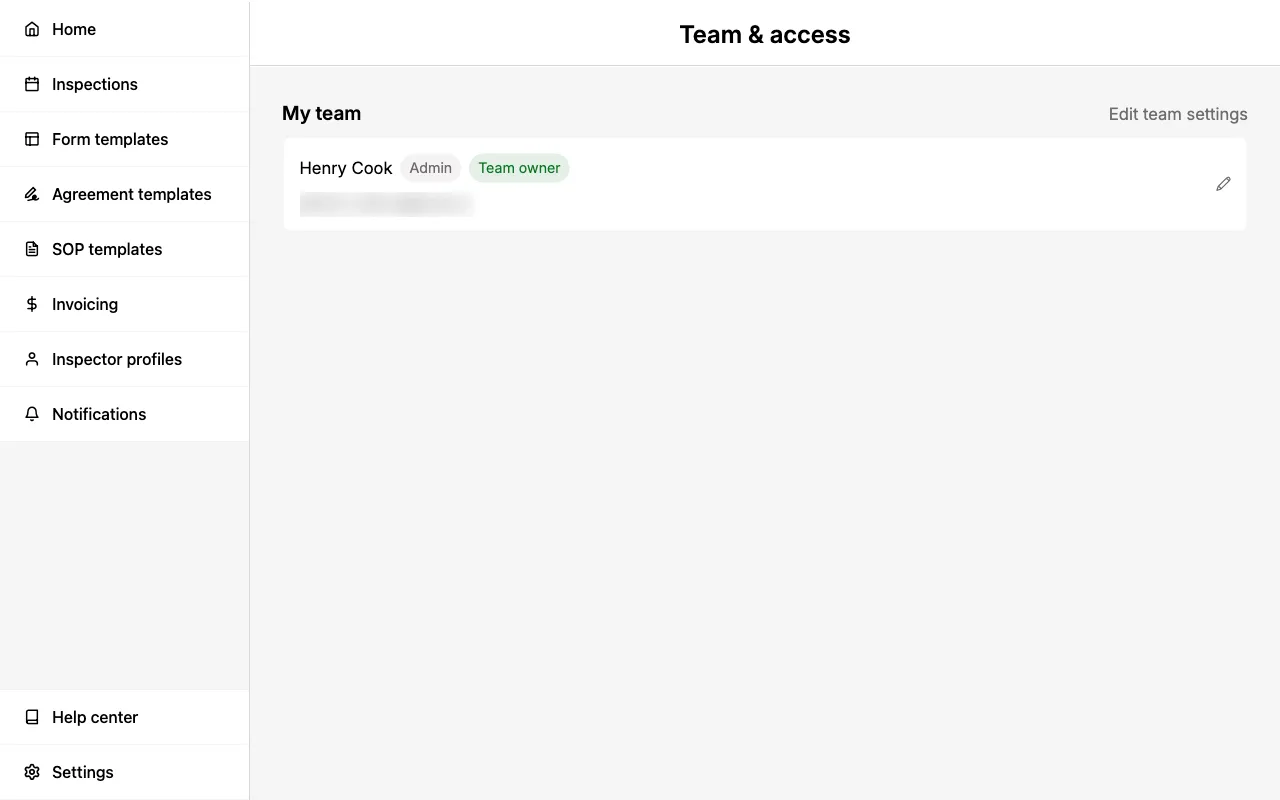
If you have an active subscription adding new team members accounts (i.e., You are setting up a multi-inspector team in Eneris Elevate) will automatically charge your credit card on file for each additional team member.
Sharing access to an inspection
Beyond team-wide roles, you can control who can access an individual inspection. Use the Manage Access card on the inspection details page to share a specific inspection with chosen team members so they can collaborate on its forms, contacts, and reports.
See Manage Access for details.
Syncing for multi-inspector
Eneris allows multiple inspectors to inspect the same property and combine their entries together into a single cohesive report.
The platform smartly merges each inspectors' entries when their Inspection Forms are synced.
Each inspector will need to sync and refresh the Inspection Form to view the latest updates from their colleagues. See syncing for more information.